Administrative units
In SYMPOSIUM by Emagister, administrative units are the groups that bring together payment receivers and financial administrators, to enable departmental financial management. Defining an administrative unit lets you restrict the scope of certain payment receivers and/or financial administrators to a subset of events.
In addition, event organizers will be able to ask to be managed by a given unit, contacting it to request the assignment of a payment receiver.
How to start using administrative units
To start using this feature we must create an administrative unit. To do so, go to the Economic administrators section in the administration panel.
When registering a new financial administrator we can assign them to an existing administrative unit or create a new one. If we select “New administrative unit” we will be asked for two details: the name of the unit and a contact email address. If we select “Global financial administrator” we will give them global permissions and their scope will not be restricted (it will be as if administrative units were not used).
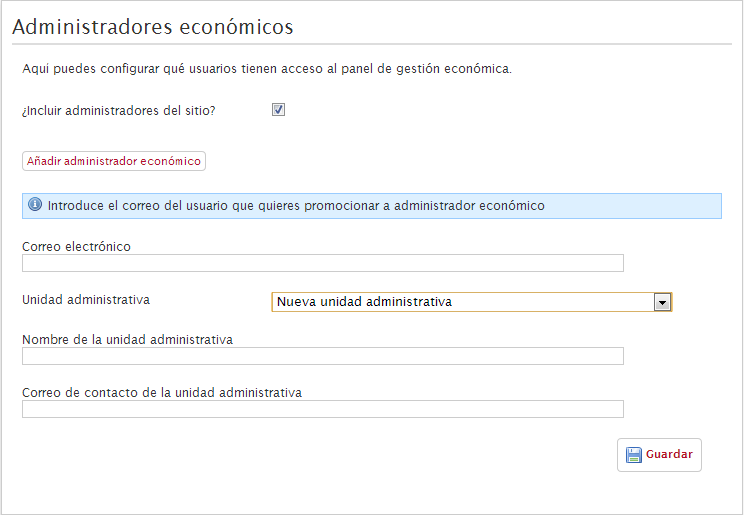
The name of the unit will be visible to administrators and event organizers and should be descriptive. The email address will be used to notify the group that there are events belonging to that unit waiting for a payment receiver to be assigned.
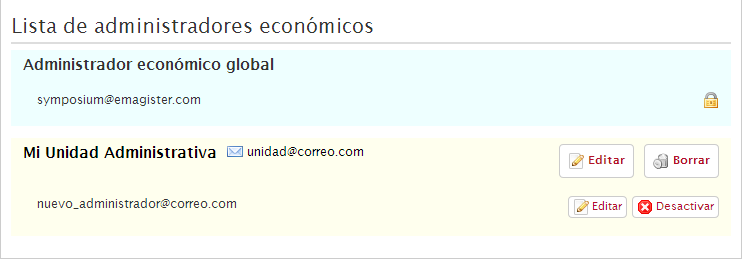
In this image we can see the result of creating a new administrator and assigning them to a new administrative unit. We now have two groups in the list: the global administrators (who are not restricted) and the new unit, named “Mi Unidad Administrativa” as an example.
We can also see a series of buttons that let us act on the items. The larger buttons, Edit and Delete, let us modify or remove the administrative unit. We can change its name and contact email at any time. The smaller buttons are used to modify the financial administrators. Edit lets us move that user to a different administrative unit (either an existing one or a new one) and Disable removes their financial administration privileges.
We can also see that there is a financial administrator who cannot be modified, which is indicated by a padlock icon. This happens when we tick the “Include site administrators?” box, and it indicates that this user is a platform administrator and therefore cannot be restricted or modified.
NOTE: For an administrative unit to exist it must have a financial administrator assigned. That is why, to create an administrative unit, you have to do it by registering a new financial administrator or by “posting” an existing one to it. If an administrative unit is emptied, it will be deleted.
From this moment on, that financial administrator will see their scope reduced to their administrative unit. They will only be able to assign the payment receivers assigned to their unit.
Restricting the use of certain payment receivers
Once an administrative unit has been created, we can register or modify payment receivers so that they belong only to that unit. This means that the financial administrators of that unit will no longer have all the receivers in the system available, but only those explicitly assigned to it.
In the payment receiver registration and editing form there is a drop-down that lets us indicate which administrative unit this receiver is restricted to.
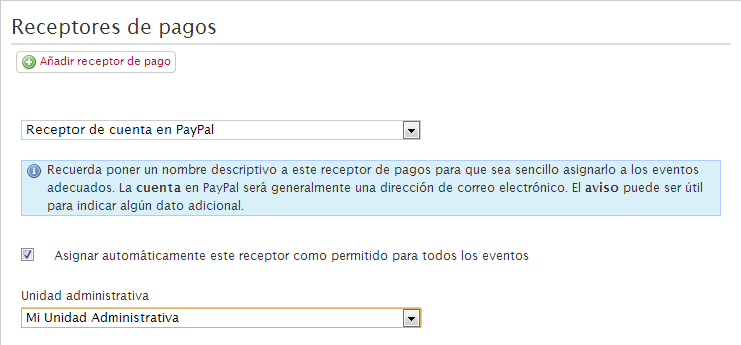
Once the changes are saved, this receiver will be linked to the administrative unit.
NOTE: Global financial administrators, if there are any, can assign receivers without distinction, unaffected by any restriction.
The event organizer: requesting a payment receiver
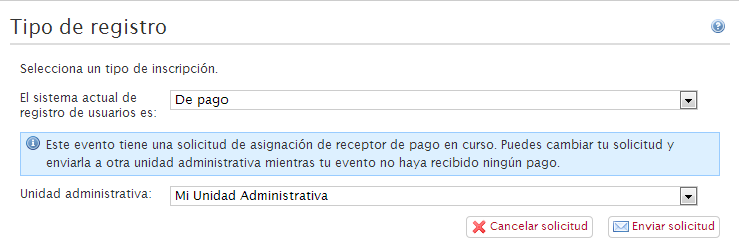
When we use a system based on administrative units, we add a new feature for the event organizer. When configuring registration for their event, they will be able to ask one of the administrative units to assign them a payment receiver.
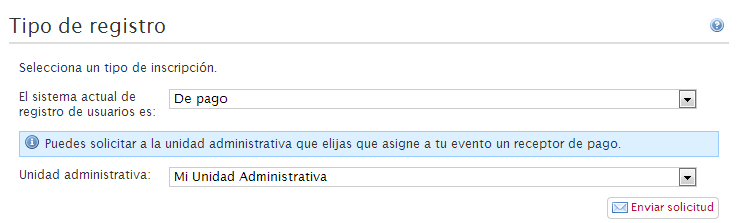
This action will send an email to the contact address of the administrative unit and will also show the event as pending assignment in the financial management panel of the corresponding unit.
This system speeds up communication between organizers and managers when starting payment processes for events.
NOTE: An organizer can request a payment receiver from an administrative unit even if they have already made a request (useful to correct mistakes in requests, etc.). The previous request will be cancelled and a new one started. This will be possible only while no payment has been received for the event. Once payments have started coming in, the administrative unit can no longer be changed.