Documentation reception
For Events with scientific documentation management, whether or not a Call For Papers has been launched, you will need to configure the deadlines and the way prospective speakers can submit their contributions. This configuration consists of setting a reception period for Abstracts (summaries) and for Papers (the scientific contents that are approved for presentation). The application is very flexible in this area too, and submitting one kind of content or the other is optional. It is also possible to set individual periods for reviewing and rating that content.
In multi-language Events, the deadlines, Tracks and Ratings settings are copied automatically from the version in the original language, although they can be changed later. Changes made in one language are not replicated in the others. Therefore, you can have different versions of this section for each language.
For Documentation reception to be available to users, three requirements must be met:
- the Event must be published;
- there must be dates for Abstracts and/or Papers and the period for one of them must be open;
- there must be at least one Track
The contents that people who want to submit papers can send will be grouped into Tracks, and the organizer can, at their discretion, set one of two Rating methods for them.
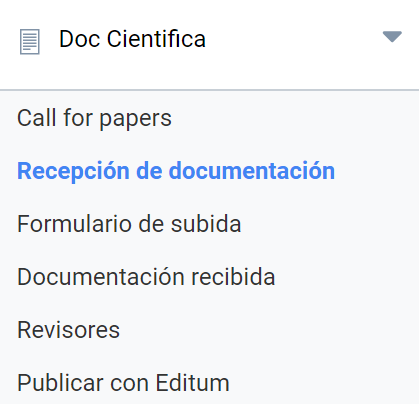
Basic concepts
- Abstract: summary of a scientific work;
- Paper (comunicación): the result of a scientific research;
- Paper (document type): a document with text, often an article ready for publication in a scientific journal;
- Range rating: a simple scoring method that sets a minimum value, a maximum value and the intermediate points;
- Rubric rating: a scoring method based on levels, criteria, descriptors and relative values for each criterion.
Receipt periods and formats
In the first section of this page you must set periods:
- For receiving Abstracts
- For rating the Abstracts received
- For receiving Papers
- For rating the Papers
It is not mandatory to configure all the sections: you can create an Event without Abstracts; you can create an Event with Abstracts but without Papers.
Symposium provides a natural flow for this: Abstracts are received for rating; Papers are expected for those that are approved, and they are rated in the same way. The idea is that only the Papers approved after this evaluation process get a place in the Event.
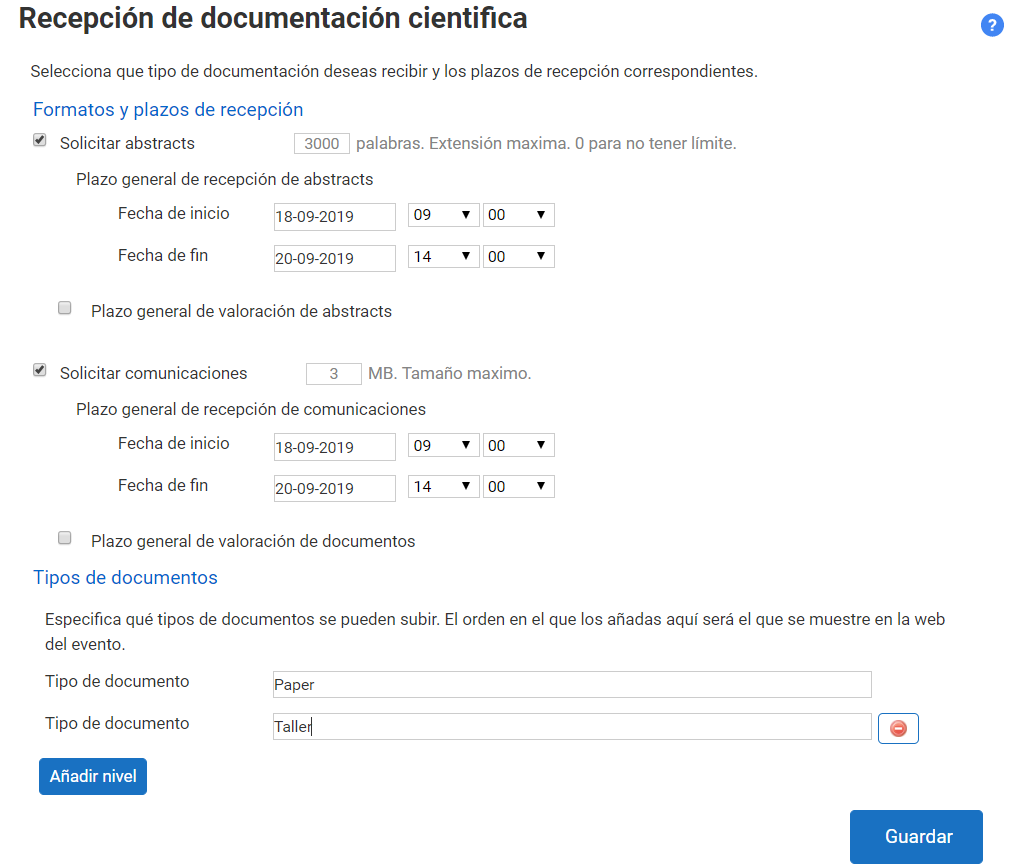
Abstracts will normally be received as plain text, and the Organizer can limit their length in words using the text box provided for that purpose. In this section it is not possible to configure the reception of attachments, although it is possible and is set in the Upload form section.
Papers, on the other hand, are expected as attachments. PDF and DOC (Microsoft Word) formats will be common. However, other file types will be accepted as long as they are not potentially dangerous for the integrity of the computer system on which Symposium runs.
Type of documents
Symposium gives you broad freedom to tell prospective speakers which types of document will be accepted for the Event. By default, it is set to accept Papers. This is actually a text box and you can change what it says. You can add new items by clicking the Add level button and typing the expected document type in each text box. The order here matters because it will be shown the same way on the Event website.
This section does not set any limits on file types; it only shows text labels. You can also remove document types with the red button to the right of each one. You can edit them by changing the text in each box and clicking Save.
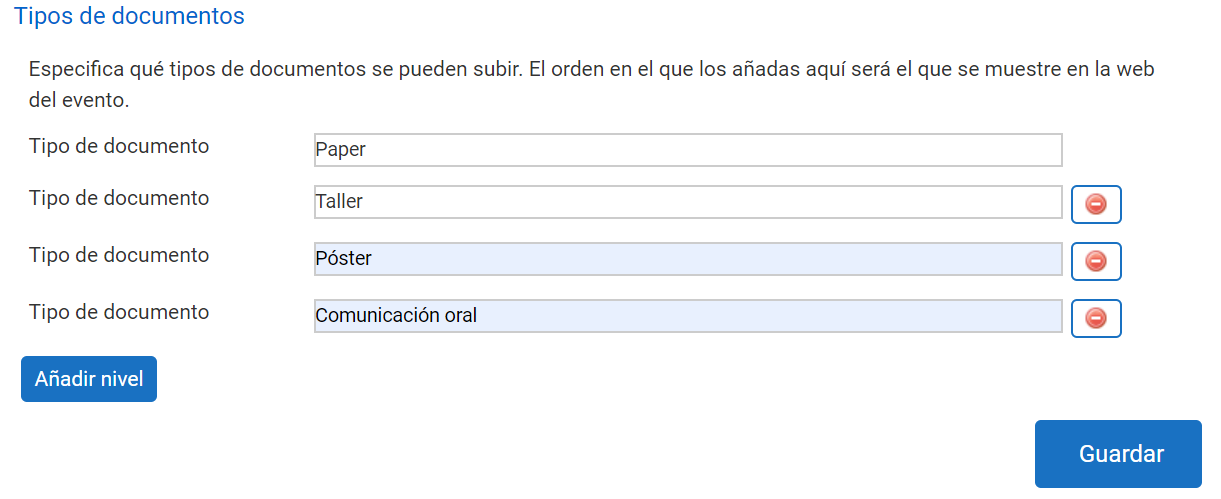
As you can see, the Event website shows a list of options with the document types previously entered in the management panel.
Tracks
Tracks have a title, optionally an owner, a text description and some individual settings, which are also optional and not mandatory.
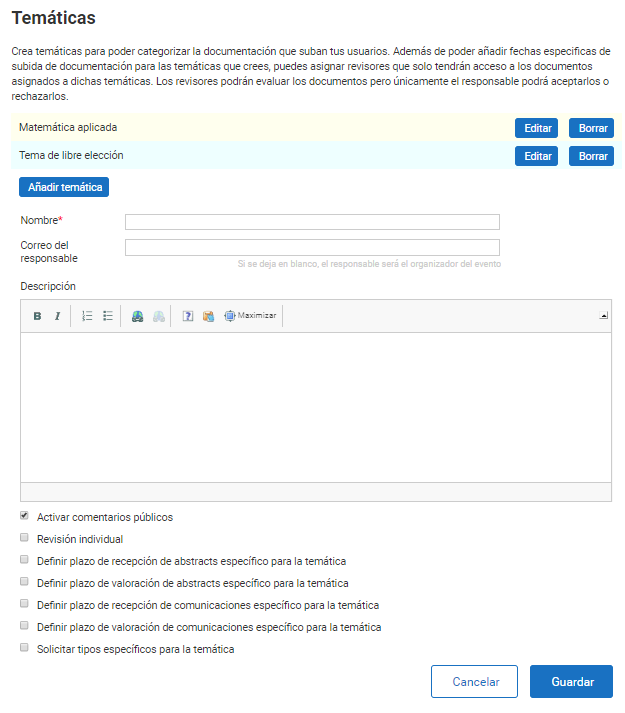
You can create as many Tracks as the Event requires. They will appear in a list on this page and can be edited or deleted. Once there is Received documentation, a Track can be edited but not deleted.
The options of each Track, if set, override the generic values for the whole Event set at the beginning of this section, and they are:
- Enable public comments: lets users of the Event website post comments on the Documents associated with the Track and have them shown on the Event website;
- Individual review: enables each Document (whether Abstract or Paper) to have an individually assigned Reviewer. If left disabled, the Reviewers assigned to that Track will be able to see all the Documents;
- Specific deadlines for the Documents of this Track: - Reception of Abstracts - Rating of Abstracts - Reception of Papers - Rating of Papers
- Request specific types for the topic: allows a specific Track to accept different Document types from those defined as generic for the whole Event.
Ratings settings
Symposium supports two ways of rating the Documents received: by Range and by Rubric. They can be applied independently to Abstracts and to Papers.
Range rating
This is the simplest method: each Reviewer scores the work they evaluate with indicators, usually numeric. You must set a minimum value, a maximum value and the intervals between them. A classic example is a score from one to ten in steps of one.
Rubric rating
This is an evaluation method that describes the specific characteristics of the research by means of levels, allowing greater objectivity. You can define a series of evaluable criteria with a precise description and a relative value scale for each of them, as well as the different grades that can be reached within each criterion. The process is extensive and is explained in detail in Rubric rating.