Requesting an invoice
When you purchase a paid registration or product, you can request an invoice before completing the payment and afterwards.
Requesting an invoice during the registration process
To issue an invoice, a paid registration or product must be purchased and, in addition, the event must have a payment receiver configured so that invoices can be issued.
You will find the option to request an invoice in the last step before completing the registration process, specifically in the “Order review” section. In this last step you must choose the payment method and tick the “Request an invoice” box.
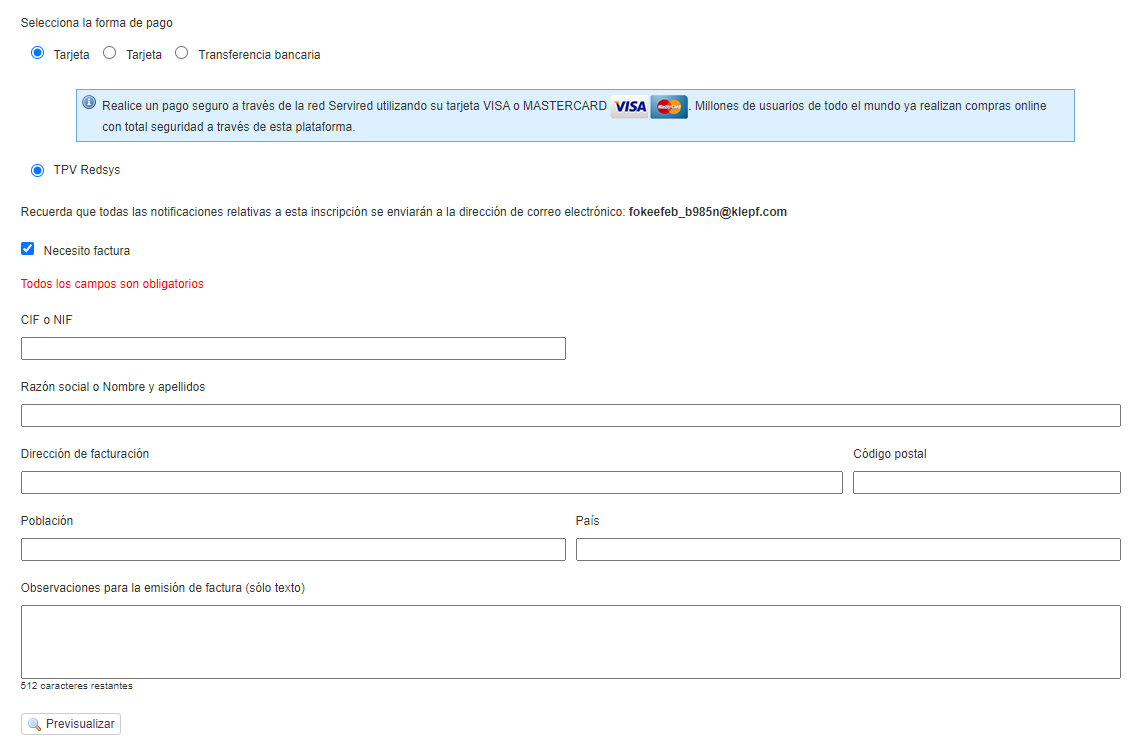
Fill in the form with the billing details. In the “Remarks” field you can add additional information to your invoice, which will later be reviewed by the Financial administrator. This field can be left empty.
After completing the billing form, you can preview a proforma invoice to make sure all the details are correct. Afterwards, you will be able to download the invoice from your attendee panel or from the payment confirmation email.
Requesting an invoice after registering
If you have already registered and forgot to request an invoice before completing the payment, you can do it later from your user panel:
Access your panel by logging in to the platform. If you are not a registered user, you can activate your account and log in.
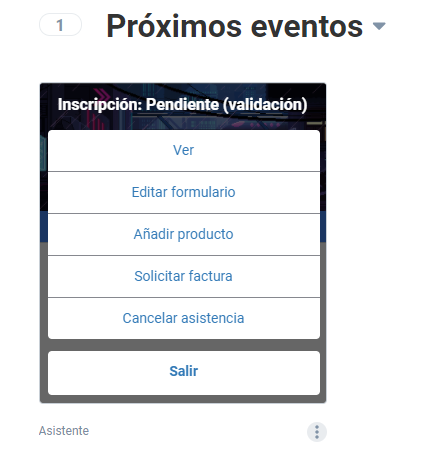
Find the event card and, among the options, click “Request an invoice”
- Fill in the billing details.