Creating the event
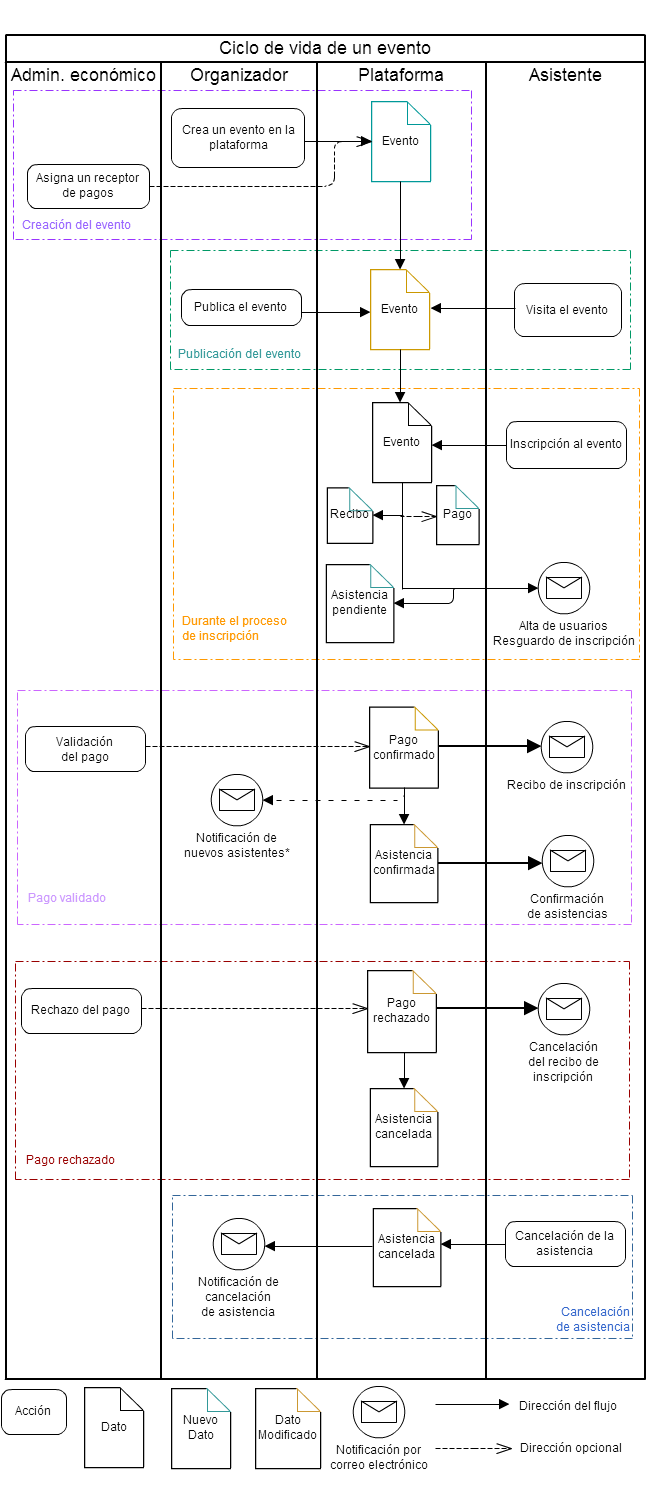
The organizer creates the event, filling in all the data they consider necessary. If the event has any paid registration, a financial administrator will assign a payment receiver to the event.
Publishing the event
When the organizer considers the event ready, they publish it. Once it loses its draft status, the event can receive visits from other users and appears in search engines.
During the registration process
When a user decides to register, a process starts that will link one or more users with one or more registrations of an event. This association is saved in an object called a receipt, which has a unique identifier. If the receipt involves payment, it has a payment status, which is created as Pending. The attendees’ registration or registrations are also created as Pending.
All this data is created and stored at the moment the user decides to confirm the operation and (optionally) proceeds to pay. This is done to avoid errors arising from delegating payment management to third parties. When the user leaves the platform to make the payment, the data has already been stored and processed, avoiding any loss of information.
Likewise, when the operation is confirmed, a series of email communications are sent:
- The buyer receives a receipt with the details of their booking
- The attendees receive their user account details, if they are new users. They are also informed of the booking of their registrations
- If the event has a predefined welcome message, it is sent to the attendees
Payment validated
When the financial administrator validates a payment, its status is updated. The attendance becomes confirmed if validation is automatic. When these updates happen, three email communications are sent:
- The buyer is informed that their payment has been completed successfully
- The attendee is informed that their attendance has been confirmed
- If the event requires validation, the organizer is informed that there are new attendees pending validation
Payment rejected
When the financial administrator decides to reject a payment, it is updated immediately. The buyer of the registrations will receive an email with the information needed to make the relevant claims in case an error has occurred.
If validation is automatic, the attendance will also be rejected.
Attendance cancellation
If the user unilaterally decides to cancel their attendance, a message is sent to the event organizer to notify them. The cancellation of the attendance takes effect immediately, although no refund of any kind is processed; those tasks are left in the hands of the financial administrators.