The registration process
Registration flow diagram
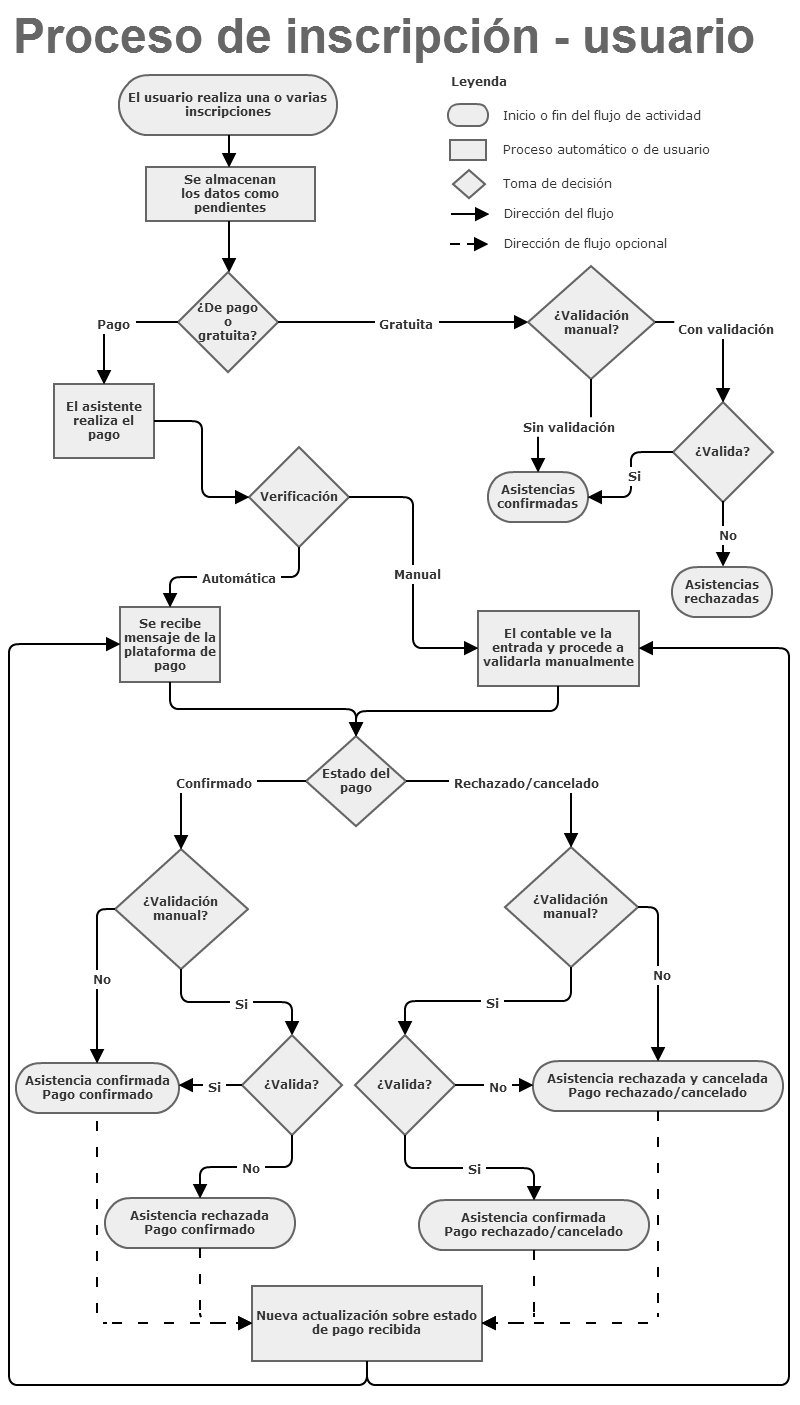
Introduction: the actors involved
In the process of registering for a SYMPOSIUM by Emagister event there are several actors that take part in how registration is processed and carried out. Below we break down these concepts by way of introduction.
Organizer
The user who created the event, or a user who has been given the authority to change its registration settings through the various mechanisms available in Symposium.
Attendee
The user who has registered for our event.
Financial administrator
A system administrator user with the authority to assign a Payment receiver to an event, as well as to validate and reject payments.
Registration
A registration (or ticket) is an entity that groups together a set of properties and that, when assigned to a user, makes them an Attendee. The registration is defined by a name, a description, a price, a number of available units and an availability period.
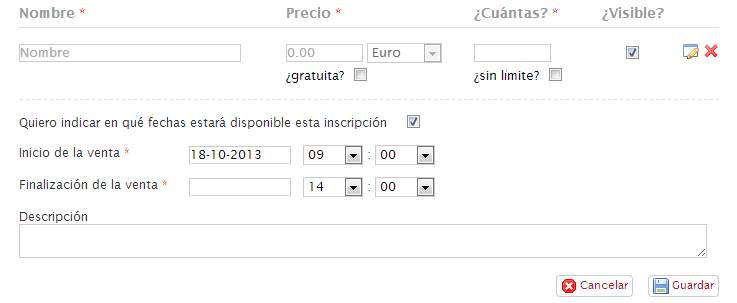
A Registration will be available as long as:
- We are within the Registration period
- There are units available and the Capacity has not been reached
- A payment receiver has been assigned, if the registration is paid
- The registration is marked as ‘visible’
Registration for an event can be made through different registration types (or tickets). For example: an event can have a discounted registration for students and another standard registration.
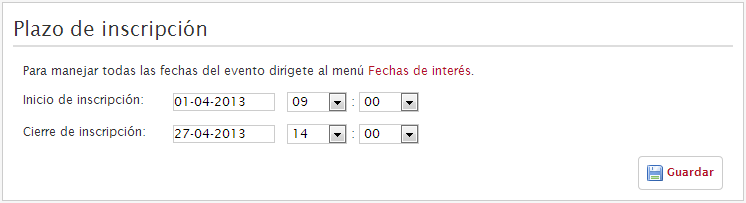
Registration period
A date range during which registration for the event is enabled (the Registration dates setting). Outside this range, registration for the event is not possible. The Registration period takes precedence over the availability period of a registration type (ticket); that is, if the Registration period closes, the Registration will not be available even if its availability period says otherwise.
Validation
A mechanism through which the Organizer has the authority to decide whether or not to accept an attendee, regardless of any other data. This mechanism is optional.
Payment status
Indicates whether a payment made to complete a registration has succeeded, is pending, or has instead been cancelled or rejected. For a free registration this status is ignored.
Payment receiver
An internal mechanism capable of receiving a payment through one of the available platforms. An event must have a payment receiver assigned for paid registrations to be available.
A ‘default’ payment receiver can be set so that it is assigned to all paid registrations.
Administrative unit
An optional system for grouping various actors in order to split up the platform’s financial activity. An Administrative unit groups together payment receivers, financial administrators and events.
Configuring registration for an event
When we create an event, it is initially set to No registration. Two types of registration managed from SYMPOSIUM by Emagister can then be configured: free registration and paid registration.

From the event’s editing menu, within the Attendees section, we will find the Registration subsection. At this point our event is set to No registration. We can open the drop-down menu to select one of the two options mentioned above.
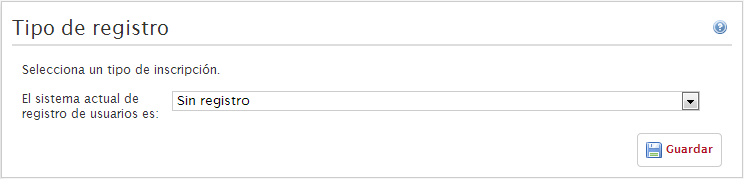
Free registration will contain only registrations at no cost, whereas paid registration can contain both types.
Once we select the registration type, we will be asked to specify the Registration period. This period restricts the dates on which registration will be available and must not go beyond the event dates.
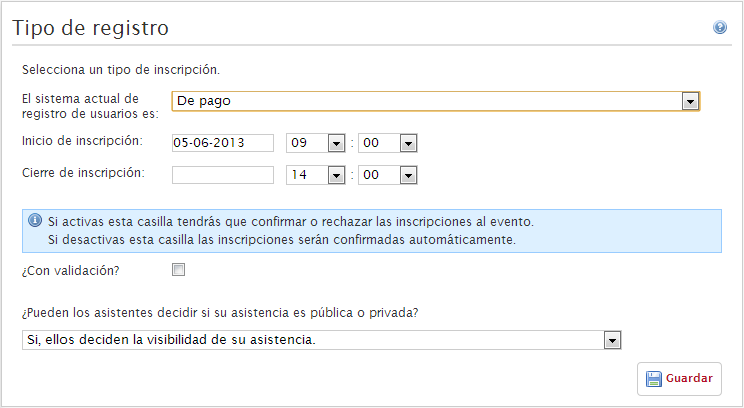
We will also be asked whether we want to enable validation. Enabling it gives us the authority to accept or reject an attendee manually, regardless of the payment status of their registration or any other factor. This tool is useful when admission to the event is restricted to a group with certain requirements or is liable to any other kind of unwanted registration.
Finally, after saving the changes, we must create our first Registration.
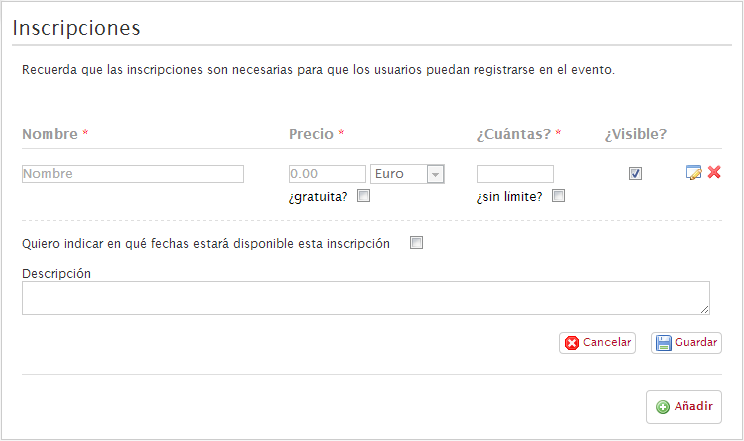
If we have created a free event, a registration at no cost will be created automatically. If we have decided that our event will be paid, we will be taken to the Registration creation form so that we can define the appropriate values. We can create as many registration types (tickets) as we consider necessary.
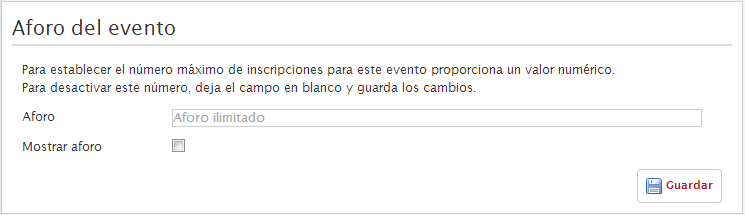
We can also specify the capacity of our event. In this way, we can create several tickets with unlimited quantity but cap total sales at a given figure.
Lastly, we can add a questionnaire to each registration we have created. We can do this from the Registration form subsection, which we will find in the Attendees section.
Frequently asked questions
When are registrations available?
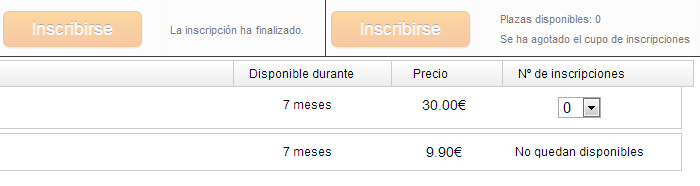
Registrations are available when we are within the registration period and, if the registration has its own availability dates, we are also within those. In addition, the available units must not have run out.
If the registration is paid, it will only be available if a payment receiver has been assigned to the event.
How can an organizer request a payment receiver?
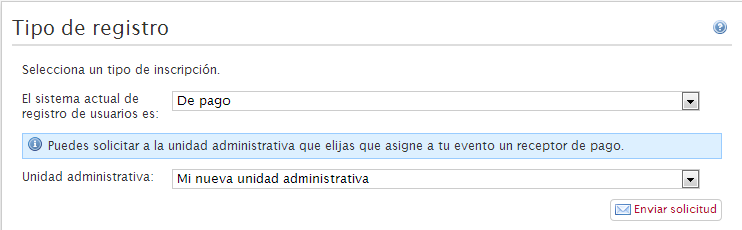
If Administrative units are used, when the event is set as paid the organizer will be shown a form to ask one of the available administrative units to assign them a payment receiver.
Likewise, even if administrative units are not used, financial administrators will see in their administration panel the events awaiting assignment.
Lastly, the platform contact form is available to request the assignment directly from the platform administrators.
If I do not want manual validation, how are attendees validated?
Attendees will be validated automatically when the payment is validated, if there is one. If the event is free, they will be validated automatically when they register. You can find a detailed explanation of the different cases here.
Registering for the event
On the event website, usually at the top or in the right-hand column, we will find the event Registration button. This button takes the user to the registration process to become an attendee.

First, the available registrations are shown and the user can choose how many of each they want to book. They are then asked for two personal details: full name and contact email. Next, if a registration form has been configured, the user must fill it in.
After doing this, the user confirms the registration. When they do, the process is confirmed automatically if it is free. If, on the other hand, it is paid, they will be shown a form to choose the method that suits them best.
When the ‘Finish’ button is clicked, the system saves all the data related to the process and marks it as pending. This makes it possible to know which users ran into a problem while registering, and in which cases. Once payment confirmation is received, the data is confirmed definitively.
Validation of registration payment and attendance
Within SYMPOSIUM by Emagister there are two types of payment platforms: those that perform verification automatically and those that require manual validation.
Those that perform automatic verification inform SYMPOSIUM themselves that the payment has been received, also giving a transaction identifier, the payment status and the date on which it took place. For those that require manual validation, SYMPOSIUM defines the transaction identifier and a Financial administrator is in charge of accepting or rejecting the payment.
| Payment platforms with automatic verification | Payment platforms with manual verification |
|---|---|
| SERMEPA/REDSYS and PAYPAL | Bank transfer |
The relationship between attendance status and payment status
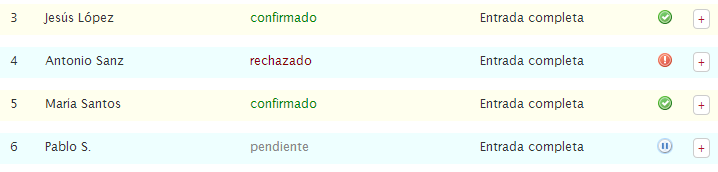
Attendance has 3 statuses, assigned by the organizer or by the platform itself:
- pending: the attendance has been neither confirmed nor rejected
- confirmed: the attendance has been confirmed; the attendee is registered for the event
- rejected: the attendance has been rejected; the attendee is NOT registered for the event
In addition, attendance can have a fourth status, which can be set by the attendee or by the platform:
- cancelled: the operation is cancelled for all purposes. It is kept as a historical record but is not counted statistically towards capacity, etc.
NOTE: The ‘cancelled’ status is independent of the 3 main statuses. An attendance can be cancelled and pending, or cancelled and confirmed. This is because different actors set these statuses, and to keep the information consistent both values need to be combined.
A payment has 4 possible statuses:
- pending: the initial status with which it is created on the platform. Until confirmation is received from the payment platform or manually, the payment is shown as pending.
- confirmed: indicates that the payment is known to have been received and is correct.
- rejected: indicates that the payment has not been received, is incorrect, or some other issue has occurred.
- cancelled: indicates that the user or their payment platform has decided to back out of the process and stop the operation.
With manual validation there is no relationship between the statuses. The organizer decides whether to confirm the user manually, regardless of the status of the payment. There is no logical link between the two entities within the platform.
If, on the other hand, validation is automatic (no validation), the attendance will have the same status as the payment. In addition, the rejection or cancellation of a payment also causes the attendance to be cancelled.
The following table shows the attendance status when an update on a payment’s status is received.
| Payment status | Attendance status |
|---|---|
| Confirmed | Confirmed |
| Rejected | Rejected and Cancelled |
| Cancelled | Rejected and Cancelled |
Frequently asked questions
When a payment is cancelled, what data remains on the platform?
All of it. A cancelled payment is shown as such but is not deleted. Both the payment and the attendance that originated it remain in the system as cancelled. They do not affect statistical calculations, but they can still be accessed to deal with claims, etc.
If a payment is rejected by mistake, does the user have to register again because their attendance is shown as cancelled?
No, because the financial administrator has the authority to validate that payment again, confirming that attendance once more. Since the data is not deleted, the attendance will show the same information as before it was cancelled.
Does the financial administrator have any restrictions when cancelling or accepting payments?
The platform administrator can create a security password that will be required when rejecting a payment, as a security check. There is no other restriction. The Financial administrator can accept or reject a payment as many times as necessary, and this activity is recorded for later analysis or review.
Can an attendance be “uncancelled”?
Yes. If the accountant, through manual payment validation (bank transfer), confirms the payment of your cancelled attendance, it becomes confirmed.
What is a named registration?
It is a registration process in which the products have been assigned to the attendees. There are two types:
- When the registration process is individual: all products belong to the single registered attendee.
- When the registration process is multiple: each product belongs to the attendee who was selected during registration.
Business rules
If a multiple registration mixes free and paid tickets, the payment status of that registration also affects the free tickets. That is, if the payment of this registration is rejected, the free tickets will also be rejected.
If a multiple registration has both free and paid products associated with it, the payment status of that registration also affects the free products. That is, if the payment of this registration is rejected, the free products will also be rejected.
Attendance status does not affect the sales count; only payment status affects it. That is, there can be a registration with a cancelled attendee whose payment is correct, and it will therefore add the corresponding amount to the statistics, listings and Excel files.
Attendance status does affect the count of available units: - Cancelled ones do not count as purchased tickets. - Cancelled ones that are part of individual registration processes with products, or of multiple named registration processes with products, cause their products not to count as purchased products.
The count of products linked to cancelled registrations excludes those linked to anonymous (non-named) multiple registrations, because it is impossible to know which product each registration affects.